Tayu Got Lighter. Here’s How 7 Mac Live Wallpaper Apps Compare on CPU
Tayu now uses close to 80% less CPU than before with sound off, and about 60% less with sound on. We also ran Aerial, Backdrop, MacScapes, Portal, Wallpaper Reactor and Wallspace on the same Mac to see where it lands.

Short version: On an M5 Mac with sound off, Tayu now uses 3.2% of one CPU core while playing a 4K scene, down from 14.0% before its October 30 update, close to 80% less. With sound on, it uses 7.5%, down from 17.9%. Next to six other live wallpaper apps on the same Mac, Tayu now sits with Portal (4.2%) and Wallspace (4.2%). Backdrop used 13.3%. Measured October 31 to November 2, 2026.
Tayu’s October 30 update (version 0.8.7) is mostly about one thing: Tayu now asks much less of your Mac. A wallpaper is something you have on every day, so we want Tayu to be easy to leave running without a second thought, a quiet part of your work and the rest of your day.
Tayu before and after — close to 80% less CPU
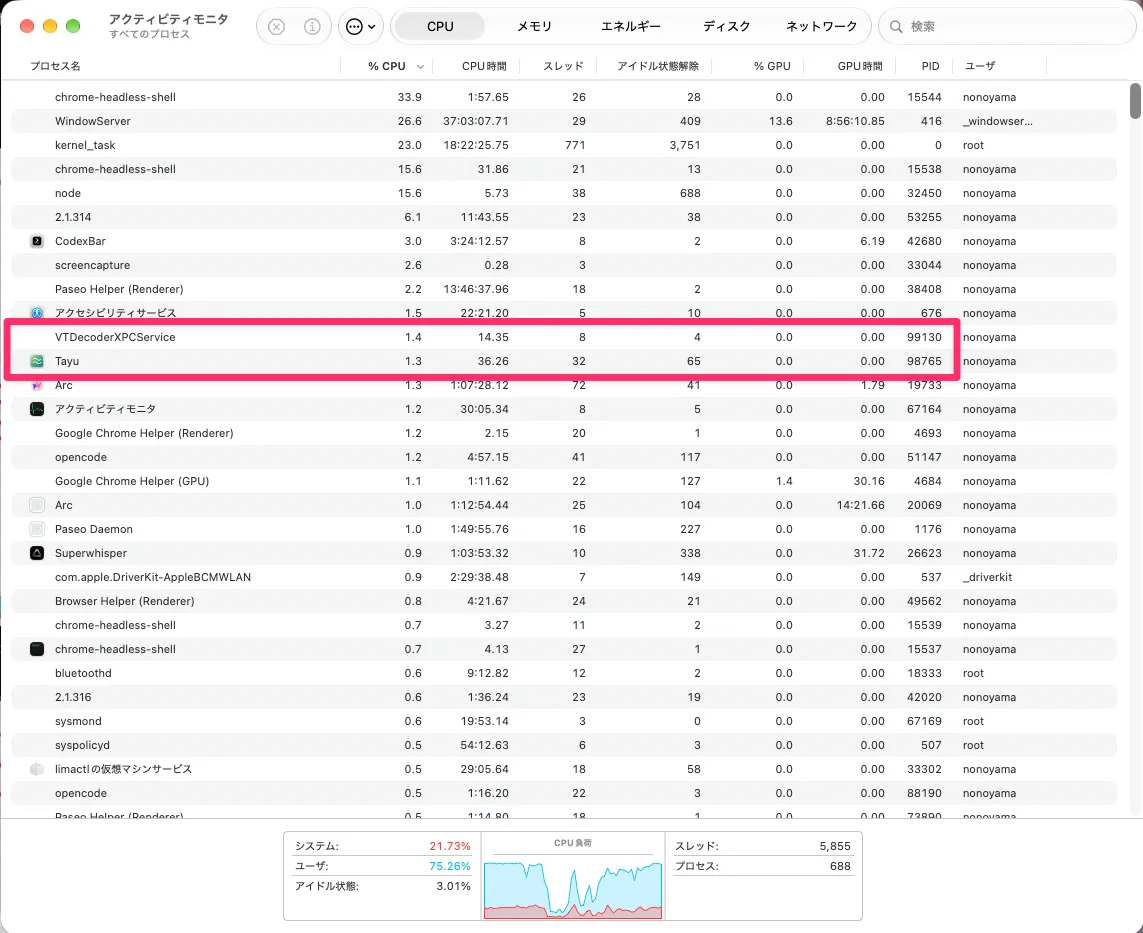
We played the same 4K scene, Hoarfrost, in Tayu before and after the update, back to back on an M5 Mac, and counted the CPU used by Tayu plus the parts of macOS it uses for video and sound. With sound off, Tayu now uses 3.2% of one core, down from 14.0%, close to 80% less. With sound on, it used 7.5%, down from 17.9%, about 60% less. There’s nothing to turn on: it applies to every scene.
| Tayu | Sound off | Sound on |
|---|---|---|
| Before | 14.0% | 17.9% |
| Now | 3.2% | 7.5% |
What changed in Tayu
Tayu was doing more work than it needed to while a scene played. In this update we cut that back to what it actually needs. Nothing you see or hear changed. As the people who make it, it just feels cleaner, and we like it a lot better this way.
- Muted means quiet. When a scene is muted, at zero volume, or muted automatically, Tayu stops its sound completely instead of keeping it running silently.
- Sound costs less. Tayu plays sound with less work, and checks its place in the video every 10 seconds instead of constantly.
- It waits to be told. Tayu can pause when another app plays sound. It used to check every app once a second to find out. Now macOS tells it when something changes.
- Less to draw. Hidden layers behind the video are now transparent and the window is simpler, so it’s easier for macOS to put on screen.
One thing stayed on purpose: the soft fade where a scene loops. Without it the loop looked jumpy.
Tayu, Portal, Wallspace, Backdrop and more — CPU use on one M5 Mac
Since we were measuring anyway, we ran six other live wallpaper apps for Mac on the same machine: Aerial, Backdrop, MacScapes, Portal, Wallpaper Reactor and Wallspace. Each played one of its own scenes with sound off, counted the same way as Tayu.
Tayu now sits with Portal and Wallspace, all around 3 to 4%. A gap of about one point is within what a different scene or a second run could change, so we’d call it a tie.
Aerial — about 8.4% while playing
Aerial used about 8.4% playing Mac (Purple) in 4K at its default 0.125× speed, counting its wallpaper extension and the video decoder. By default Aerial pauses when windows cover 60% or more of the screen, and while paused it used close to nothing. We turned that off to measure playback, so in daily use Aerial often uses less.
Backdrop — about 13.3%
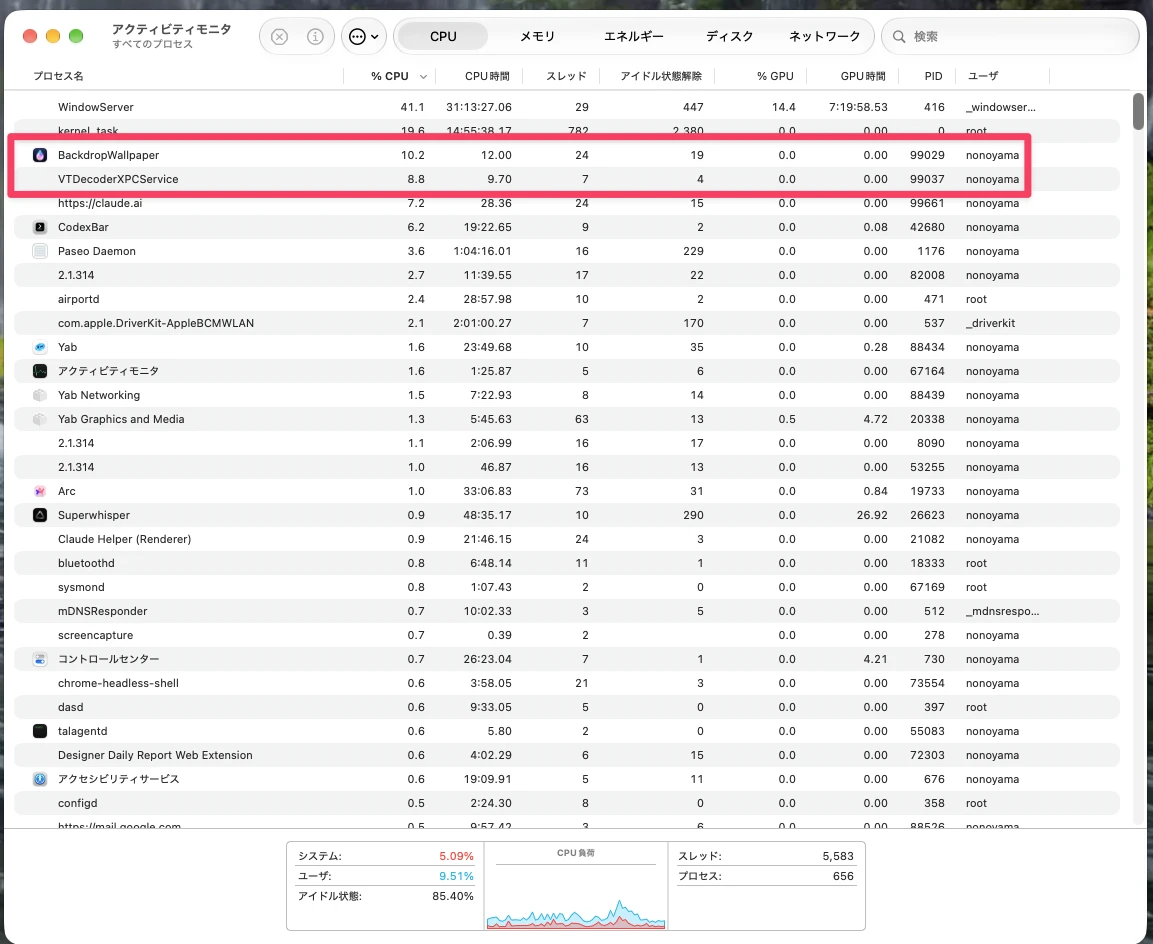
Backdrop used about 13.3%, close to where Tayu was before the update. That was Backdrop without a subscription, playing Peaceful Water in 4K. It was heavier than we expected. In the Activity Monitor screenshot below, most of it comes from the BackdropWallpaper process and the macOS video decoder.
MacScapes — about 2.2% CPU, 14% GPU
MacScapes used the least CPU of the seven, about 2.2%, playing its default scene Quiet Morning during its Pro trial. It draws its scenes on the graphics chip instead of playing a video, and it kept the GPU about 14% busy. We checked Tayu too: Tayu’s own process used none of the GPU, and macOS’s screen drawing went up a little while it played, too unsteady for us to put a number on.
Portal — about 4.2%, 11.0% with sound
Portal was lighter than we expected: about 4.2% playing Pedn Vounder Waves from its free Open Access playlist, with Play audio off. Its sound is really good, and with sound on it went up to about 11.0%.
Wallpaper Reactor — about 13.0%, 10 points of it audio
Wallpaper Reactor, free on the App Store, came to about 13.0% playing Dark Waves. The video itself took about 3%, like the others. About 10% came from the macOS audio service (coreaudiod), even though that video has no sound track, and it went away after we removed Reactor. It looks like its sound features at work. We didn’t dig further.
Wallspace — about 4.2%
Wallspace used about 4.2% playing the scene it already had set, level with Portal and close to Tayu’s 3.2%.
Here’s what that looked like in Activity Monitor for Tayu and Backdrop.
How we measured Mac wallpaper app CPU use
- All apps ran on the same M5 Mac, one at a time, between October 31 and November 2, 2026, with sound off unless noted.
- Once a scene was playing, we read CPU use with macOS’s
toponce a second for 16 seconds, dropped the first 5 readings and averaged the rest. - We counted the app’s own processes plus the parts of macOS that work for it: VTDecoderXPCService for video, and coreaudiod and usbaudiod for sound.
- Numbers are a share of one core, the way Activity Monitor shows them.
- Versions: Tayu 0.8.6 and 0.8.7, Aerial 4.1.9, Backdrop 2.10.4, Portal 4.0.1 and Wallspace 1.6, with MacScapes and Wallpaper Reactor as on the App Store on those dates.
- Each app played its own scene, and each got one short run. Tayu measured 2.7% in an earlier run, so read a gap of about one point as noise.
Also in this Tayu update
- Playlists and Flow now skip YouTube videos that can’t play, with no error, and remember them after a restart.
- Thumbnails load faster.
- Picture in Picture and Overlay are more reliable, and the main window shows a mark while a video plays there.
- Schedules stay in sync when entries overlap or change while running.
- Videos paused for another app’s sound stay paused after a reload.
- Time Tayu was closed no longer counts toward Base rotation.
If you already have Tayu, it offers the update when you open it, or choose Check for updates in Settings. Every release is listed on What’s New.
What’s next for Tayu
First, many more scenes. After that, we want playing a video wallpaper to be the simplest thing in the app. Features like Base and Schedule should stay out of the way if you don’t use them, and be there when you do. We also want you to be able to add your own videos.
If Tayu already plays behind your work, we hope it now feels a little lighter to live with.

Tayu — a healthy rhythm for desk work
A calmer live wallpaper for Mac
Tayu pairs 4K nature scenes with ambient sound, YouTube wallpapers, playlists, schedules, and AI scene switching for focused work and small breaks.